
Product
The workspace that runs your whole firm.
One calm place for matters, evidence, deadlines, trust, billing, and intake — built for a lawyer who is also the whole firm.
Quick answer
What workflows does FamilyCase support?
FamilyCase supports family-law matter work including client portal workflows, billing context, intake, and firm operations.
- One workspace covers matter work and firm operations.
- The product supports attorney-reviewed litigation preparation.
- Client portal and operations workflows reduce tool switching.
A real look inside. No demo wall.
See the real workspace. Then schedule a demo.
Most legal software hides behind a "request a demo" wall. FamilyCase shows the real attorney workspace and client portal preview, then routes evaluation to a demo — workspaces are invite- or onboarding-provisioned.
See it in action
The workspace that runs your whole day.
A calm, one-decision-at-a-time interface built for a lawyer who is also the whole firm.
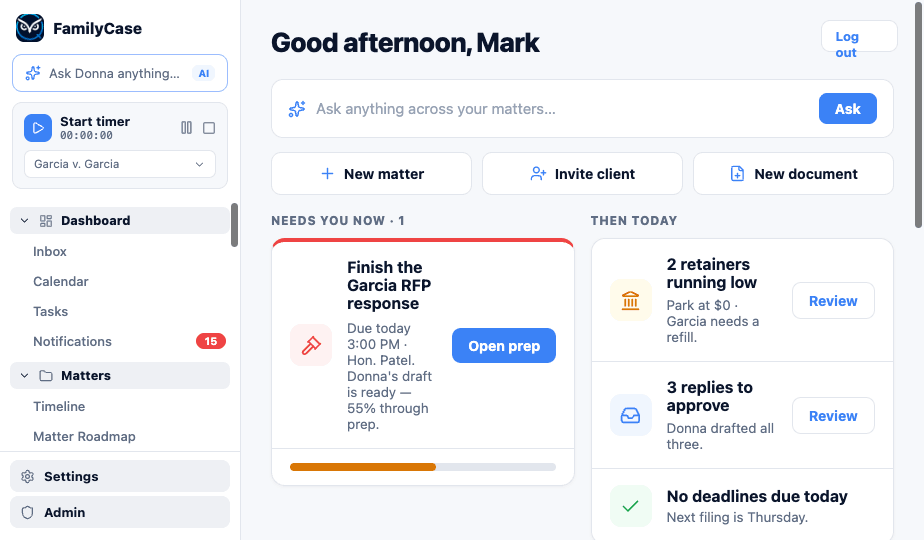
Your day, triaged
The Today workspace opens on the one thing that needs you now — then the short list. No hunting.
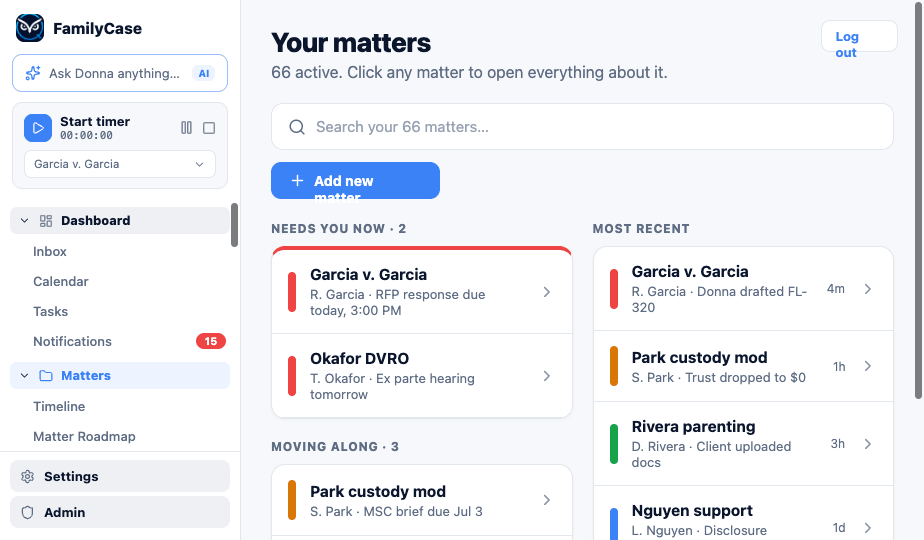
Every matter, grouped by urgency
Needs-you-now, moving-along, waiting-on-others. Every matter in one view, no spreadsheets.
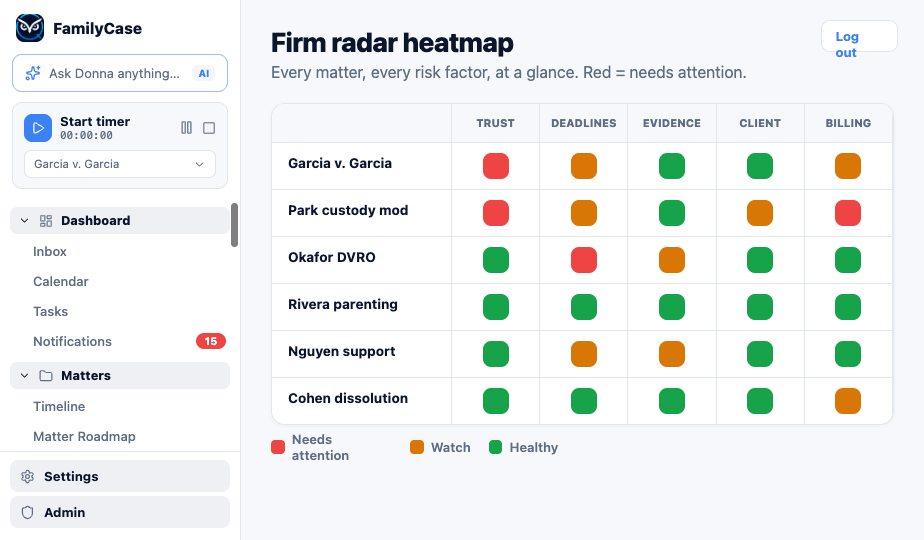
Firm-wide risk at a glance
Oliver's radar shows trust, deadlines, evidence, and billing health across every matter.
The unified workspace
Everything in one place. The whole firm, at a glance.
No more switching between six tools to run one matter. FamilyCase brings the case and the business into a single workspace, built for family law.
Today command center
Your Today command center shows active matters, deadlines, trust, billing, intake, and matter risk at a glance.
Client portal
A client portal gives clients their roadmap, documents, approvals, questionnaires, and billing in one place.
California Family Code guardrails
California Family Code guardrails support best-interest, safety, and ex parte review, with attorney verification required.
Why FamilyCase
Software that helps with the work. You make the decisions.
Pricing
One price per lawyer.
FamilyCase Professional is priced per lawyer, per month, so a one-lawyer firm pays for one seat.
Try it on your own matters in the 7-day pilot before you commit.
Legacy software
Your old software stores files. Donna and Oliver help with the work.
Your old practice-management tool is a filing cabinet with a login.
Burnout
Get the lawyering back. The AI assistants take the first pass on admin, and you review it.
FamilyCase surfaces the intake queue, the tone-check on the hostile email, the trust warnings, and the deadline chase so the hours go back to the work only a lawyer can do — you still approve every send.
Get your evenings back with reminders that chase themselves.
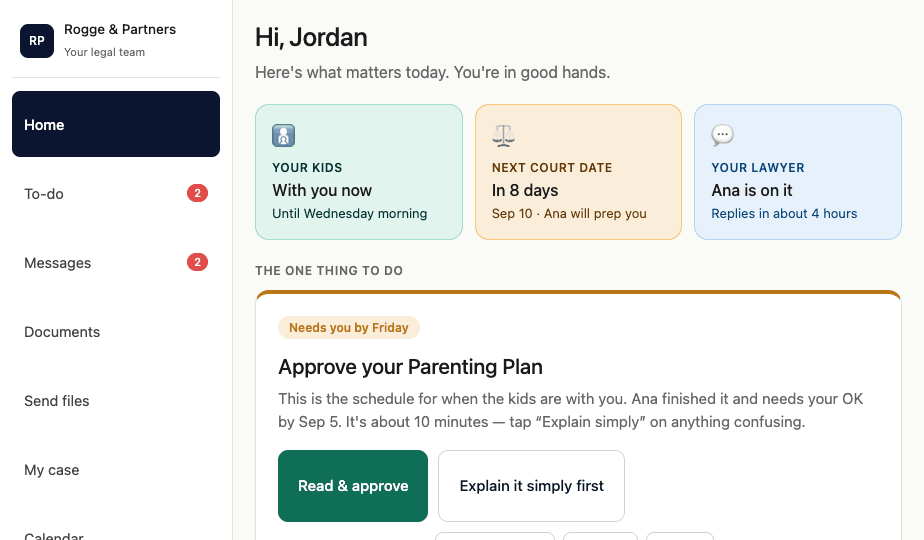
The client portal
A calm client is a client who refers you.
Your clients get a plain-language portal that answers the questions that keep them up at night — where their kids are, what's next in court, and that you're on it. Fewer panicked calls. Faster approvals. More referrals.
- One-tap document review & e-sign — opens in Google Docs, Word, or PDF
- Send evidence from any device, Dropbox, Drive, OneDrive, or Box
- Approvals, messages, and their case story — in plain English
Switching is not your problem anymore
Leave Clio, MyCase, or the filing cabinet without the migration headache.
Free white-glove migration brings your matters, clients, time entries, trust ledger, documents, and calendar across, with the fields mapped for you. Your old system stays live until you say go. We do the heavy lifting, so "too much hassle to switch" stops being your excuse.
Get started
Schedule a demo. Take on the case you almost turned down.
FamilyCase is built for solo and small family-law firms. Start with the 7-day pilot and check the fit with your own matters.
The attorney reviews and decides. You are always the attorney of record.